Cyber-Bargains

Things are simply more dynamics with E-Commerce

8:29 AM

Review-Mobile Security

Posted by Cyber Bargains |

This week I am going to do a review about the threats from mobile malware. My lecturer has reviewed about it earlier and the link can be found here-->http://ecommerze.blogspot.com/2007/06/growing-threat-from-mobile-malware.html

Is there a need to worry about mobile malware?


Are the viruses found in the mobile as threatening as the computer’s one?


What would happen if your mobile phone is infected by malware?

I am a user of Nokia E71, a Symbian based operating system smart phone which its

performance can easily surpass my 20 years old computer. This phone operates like our normal

computer, I used it to surf nets, msn chit chatting, storing files from the internet and many

more. So do I install antivirus software in this phone?

Nokia E71-My cute little phone


The answer is yes but it was 4 months ago. I used Karpersky

Mobile Security. But I deleted it

for several reasons.


Kapersky Mobile Security's display on Nokia 5800

It makes my phone performs like a snail…Slowwwww..


It did not detect any virus after I used the phone from day 1. So I presumably there is no virus

are interested enough to attack my phone or the antivirus did not do its job.


I did not use my phone to access the internet to pay

anything. So, if my phone is hacked by hackers, they most

probably would know which porno sites I visit the most. HEHE


So I would answer the question I asked just now. Yes, there is a need to worry about mobile

malware if you always use your phone to deal with financial stuff like doing e-banking which

requires user id and password. If not, keep using your phone without any antivirus software

as you can enjoy a more responsive smart phone.


Up to date, the threat of the

mobile malware is not that severe compared to the computer malwares. A survey

carried out by SMobile said there is only 1.5% of Symbian based phone is infected by

malware. So, may be in the future mobile malware will be getting more serious as the

phone capable to replace computer and this could invoke more hackers to create

malware to attack the phones.


Lastly, if your mobile phone is infected by malware, u could either hard reset the phone or thing get worse; you can send it to the phone service centre. If your latest high tech phone constantly attacked by virus, I suggest u to change to a less savvy tech phone like this:

The infamous unhackable Nokia 3310


Reference:

http://www.theregister.co.uk/2009/07/31/smobile_symbian/

http://usa.kaspersky.com/products_services/mobile-security.php
http://ecommerze.blogspot.com/2007/06/growing-threat-from-mobile-malware.html


8:28 AM

The threat of online security

Posted by Cyber Bargains |

You bought a new computer, installed the operating system and other applications including an anti virus software. But after few months or half a year, u feel that your computer is running slower than ever and more and more unknown stuff popping up to disturb you.


Using a "turtle" computer

Then you will start to think whether you are infected by any "shits" ( at least this is what i call them - virus, malware, Trojan and many more) and slowed down your computer.

You also don't want to be this poor guy screaming at his laptop after seeing his bank account is being hacked and the money is gone.

When the time people are using the internet, we seldom care or even know about the threat of using it. We simply key in our personal information to register many stuff like an email account, log in pass, facebook account and etc. This information may be easily exploited by those black hat hackers if the company which holds our data did not secure it properly. So, how safe is our data with the current protection from online security?

The most common online security threats is identity theft. This means the private information of victims are being used for other purposes. For example, the credit card number is being stolen when it is transferred over the network due to the vulnerability of online security. Then the credit card will be used without the consent from the victims and the victims have to pay for those stuff they did not buy.
Another category of online fraud takes place in the form of data theft which encompasses the theft, perusal and manipulation of private data.


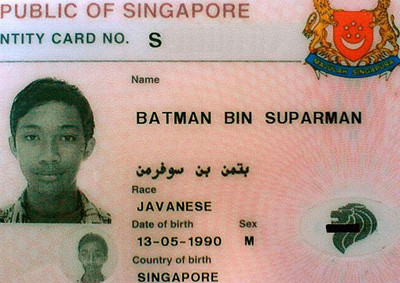
I think the hacker has hacked the Singapore ID department if not this felor's father hate him right after he is born

Next, we shall discuss some of the underlying threats to online security. First, Malware, is a software designed to penetrate and damage a computer system without the owner’s informed consent. Generally, Malware includes computer viruses, worms, trojan horses, rootkits, spyware and so forth. Specifically, computer viruses are small software programs which intent to interfere with computer operations and they may corrupt and damage your data or even erase everything on your hard disk!

On the other hand, worms are self-replicat
ing programs which do not required to be attached to other programs as it spread by exploiting security loopholes of operating system. For instance, Windows ExploreZip worm, is a destructive software with malicious purposes of crippling the file system by writing invalid data and destroying files on hard disk.


Not this kind of cute worms INFECTING your coms

Preventions which are desperately needed if you don't want to lose your precious data over the internet or reformat your computer every 2 months.

First-Activate your firewall or install one.


Hope i have this kind of firewall to cook those viruses in my Vista

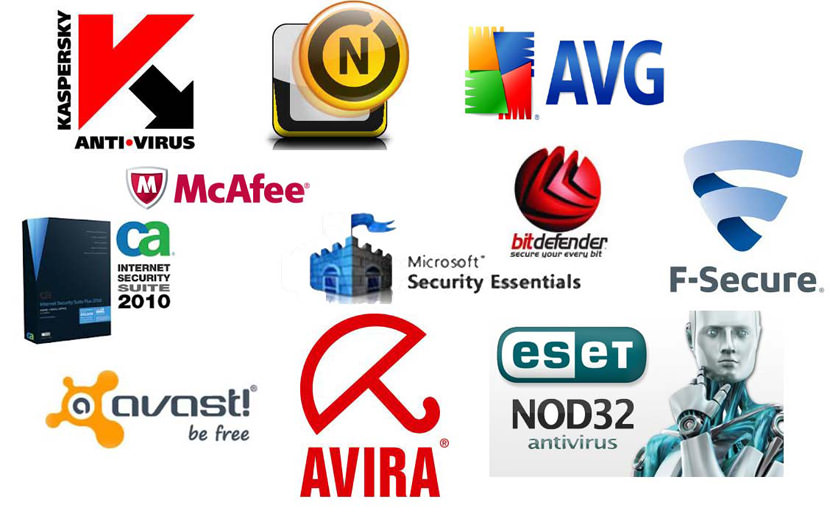
Second-Install a reputable anti virus and update it frequently.


Which is the better?or can i install all of them to get maximum protection??HAHA

Thirdly-Do backup of your computer to prevent loss of data when the computer is under attacked by the virus.

Lastly, be smart when you are assessing anything from the net including your email, attachments, any suspecious mai
l and many more. Most importantly is all down to the user, experienced internet users to tend to suffer less online threats.


8:28 AM

How to safeguard our personal and financial data?

Posted by Cyber Bargains |


Do you have a proper safeguard on your personal and financial data? Most of the people like to rely on the computer to save their data information while some of us like to make an online transaction in buying and selling through the Internet. But do u really careful in protecting your personal data from stolen, losing or misuse by the intruders? Lets me gives you some useful tips that may help to prevent your data from damaging.

Install and maintain anti-virus and a firewall – Viruses and Trojan horses that may lose or modify our data on the computer can be protecting by the anti-virus software. However, a firewall is a software program that designed to remove the bad people and allow the good people. Besides that, if we have an older computer or using a dial up, we may need to separately buy a firewall and install ourselves instead of a modem that have an added layer of protection which using in nowadays.


Using encryption key to store confidential data – In order to prevent or avoid unintended disclosure, we can use the encryption key to stored data. It means that we coded the information into unreadable form of characters, so that nobody can open our data. In addition, we can protect our data by encrypting the whole storage drive or select whichever folder as we want. If we want to ensure our data is more secure, then we should create a unique and a longer encryption key. The longer the code, the more secure the data.


Never open a mystery attachment – Do not open any link or an attachment that sending by unknown parties. It is because those of the attachments may contain viruses that will harm our data or else directly to the computer. Another reason is that if we open a link that contains viruses, it maybe will affect our personal or financial information without our notice.


Secure the network – Now everyone has Internet to make an online access to search for the information. But some of us may use a wireless network to online. So we have to make sure that we secure it, because an unsecured network would cause a hacker to gain access to anything we do. In order to be safe, we should lock our router and encrypt our information by keeping away the intruders.


Do not put private information on public computer –Nowadays, most of the people like to go to the cyber café or any other wireless zone to access for the information that they want. But they do not realize that the public computer is the most unsafely to use. Why I say so? It is because if you access your private account at the cyber café, then you have to make sure you log out completely from your accounts, otherwise another users would try to access into your personal information. Try to avoid save login information like username and password into public computer.

8:27 AM

Phishing sounds really like fishing

Posted by Cyber Bargains |

Phishing is a threat to every internet user as it gains personal financial information through sending fraudulent email. Besides, phishing also can the personal information when the users doing personal financial information through online banking or e-commerce transactions.

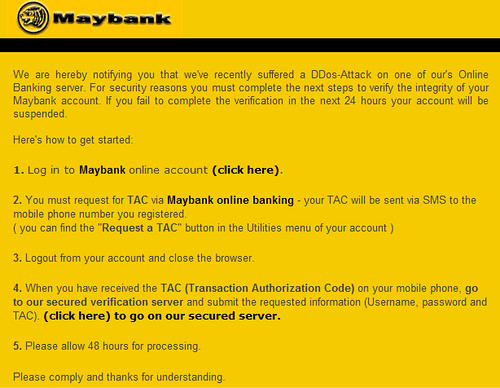
The example of a phishing e-mail is an official e-mail from a fictional bank. The phishing e-mail sent to the internet user on behalf of the bank which requests the user to send personal financial information such as credit card, social security, bank account number, passwords and others. Lately, I got a phishing scam email pretending to be Maybank2u. It required me to enter my details including my LOGIN PASSWORD. Of course I am not stupid enough to give them that and moreover the terrible grammar has worked as a warning alarm to me. However I gave it a try and luckily Mozilla prompted me the web as a phishing web. (good reason to use Firefox right?)

There are some ways that the internet users must know in order to avoid from becoming a victim of phishing.

Obviously, the users must be suspicious with any email with urgent requests for personal financial information unless the email is digitally signed. For instance, an e-mail sent by fictional bank which contain misspelling word usually is phishing e-mail. The users should never supply their personal information via e-mail. The users must always turn on both desktop and network firewalls. Firewalls can help the users prevent from the suspicious malicious code entering the users’ computer and browser.

Another easy way to prevent a phishing attack is keep the anti-virus software up-to-date. There are many products on the market usually are included in anti-virus software. This software program usually using filter which searches the content in the message that may be carries phishing software. Besides these, the users must not enter any sensitive or financial information into pop-up windows even it looks like official. This is because this pop-up window usually has no way to check its security certificate. Many of them are usually contain phishing scams which will gain the information and damage the computer.

The internet user must remember Think Before You Click. This can help the user from phishing threat.